EmailFlow Pro
I was the designer producing campaign emails at Serasa Experian. Every change took too long — so I designed and built the tool that reduced campaign production from approximately 80 minutes to 10–20.
When
2025
Problem
Campaign emails at Serasa Experian were hand-coded in HTML for Salesforce Marketing Cloud. Each one took about 80 minutes.
My role
I was the designer producing those emails. I mapped the workflow, designed the tool and built it in React with AI-assisted development.
Result
Build time went from about 80 minutes to 10–20 per email.
Solve your own pain first
At Serasa Experian (the Brazilian arm of the global credit bureau), I was the designer responsible for producing campaign emails in Salesforce Marketing Cloud. The friction wasn't theoretical — I felt it every day: changes that should take minutes meant diving back into code, and every campaign repeated the same manual ritual.
My approach was pragmatic: if I can't use UX and AI to fix my own daily workflow, how can I design efficient solutions for millions of people? EmailFlow Pro wasn't born as a portfolio piece. It was a survival tool.
Who I was actually designing for
The users weren't a market — they were my own team: the internal CRM and email-marketing staff at Serasa Experian who finish campaign emails in Salesforce Marketing Cloud. People fluent in HTML and design, but not interested in defending AMPScript edge cases on a deadline.
Designing for internal colleagues changed the priorities. There's no marketing funnel, no onboarding, no sign-up — just a tool that has to earn trust on the first paste. Because the stakes are millions of recipients, their deepest need wasn't speed, it was verifiable correctness. Speed was the headline; trust was the spec.
Jobs-to-be-done — framed as the outcomes my colleagues were "hiring" the tool to achieve, not features I wanted to build.
Design and implementation were one loop
This was not a handoff exercise. I defined the workflow around the job I needed to complete, designed the interface that made the steps visible, and built the processing logic that made the result repeatable.
The cost of "manual labor"
Developing for Salesforce Marketing Cloud (SFMC) requires absolute precision — these emails went out to millions of Serasa Experian customers. My manual workflow was a massive bottleneck:
- Time-consuming: 80 minutes per email.
- Image re-linking: Hand-swapping every local image
srcfor its SFMC content URL, one at a time, from an upload log. - High risk: Manually injecting AMPScript and checking 20+ links per campaign for millions of customers.
I was acting like a "human compiler." My creative energy was being drained by tasks that technology should have solved—but didn't.
Why generic AI (ChatGPT) failed
My first instinct was to use ChatGPT. I tried custom GPTs and complex prompts, but it revealed the limits of conversational AI:
- Technical Hallucinations: GPT often invented AMPScript syntax, creating code that crashed inside Salesforce.
- Inconsistency: Being a probabilistic model, the HTML structure changed every time. I spent more time reviewing the AI's work than doing it myself.
- Lack of Workflow: A chat is a conversation, not a tool. Copying and pasting code back and forth is just another bottleneck. I needed a precision tool, not a chat window.
Design for trust, engineer for repeatability
If the tool I needed didn't exist, I had to build it — without asking for budget, a dev team, or permission. I ran an AI-assisted development cycle in two stages:
- Functional ideation (Lovable): I prototyped the interface around utility UX. The design had to "disappear" so the function could shine: raw code in, polished code out.
- Precision engineering (Cursor): I moved the project to Cursor to code rigid business rules — deterministic sanitization that an LLM couldn't maintain consistently, ensuring the HTML met global email-rendering standards.
Deterministic rules over an LLM at runtime
Gain
Same input always produces the same output — auditable and testable.
Cost
I had to hand-write and maintain the sanitization logic instead of letting a model guess. More code to own.
100% client-side processing
Gain
Instant, and customer HTML never leaves the browser — a real concern at a credit bureau.
Cost
No server means no usage analytics or shared rule updates. Each user runs their own copy.
Opinionated one-click flow over a configurable editor
Gain
Zero learning curve; the tool disappears.
Cost
Power users can't tweak edge-case rules in the UI — they have to ask me to change the code.
What I tested — and what broke
A tool my team would trust with millions of sends can't be validated by "it looks fine." The bar was strict: the assembled email had to match the version we already produced by hand — same images, same personalization, same links. So I tested it against real campaigns, not happy-path samples.
Real campaign replay
I ran emails I had already shipped by hand through the tool and diffed the output. The assembled HTML had to match the version that already went to production.
Image-swap accuracy
Every image src in the HTML had to resolve to the correct SFMC content URL from the log — no leftovers, no wrong matches, even with dozens of assets.
Link & AMPScript integrity
I seeded emails with bad links and edge-case AMPScript to confirm the analyzer caught them and the injection survived without breaking the build.
Testing against real data surfaced three failures that shaped the final product:
The image log came in inconsistent formats
Different exports gave me "Nome: x, URL: …", plain "filename → URL", and JSON. Rather than force one format on my colleagues, I made the parser accept all three.
Filenames in the HTML didn't always match the log
Casing and path prefixes broke naïve matching, so images silently stayed un-swapped. I normalized filenames before matching so a near-match still resolves.
"Did it actually work?" anxiety
A silent transform isn't trustworthy when millions of sends are on the line. Surfacing the link analysis and a clear processed-output panel turned that doubt into a visible check.
None of these showed up in the original prototype. They only appeared under real logs and real campaigns — which is exactly why shipping a working tool to my own team and stress-testing it beat polishing a mockup.
The tool, end to end
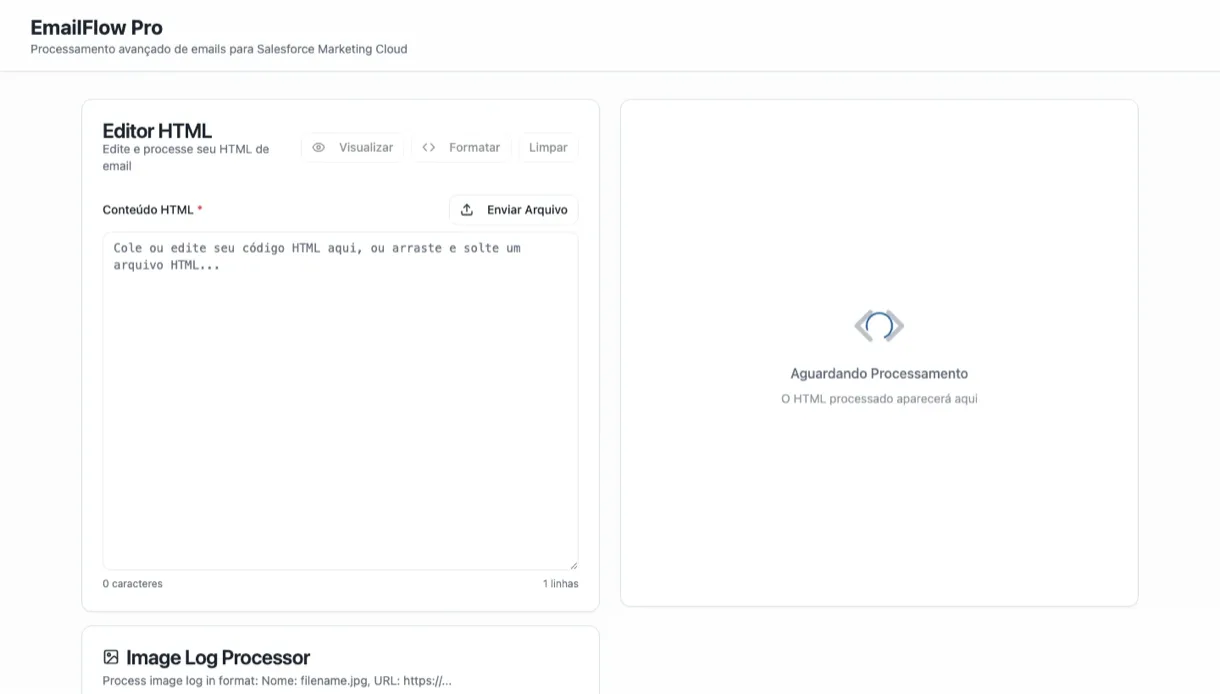
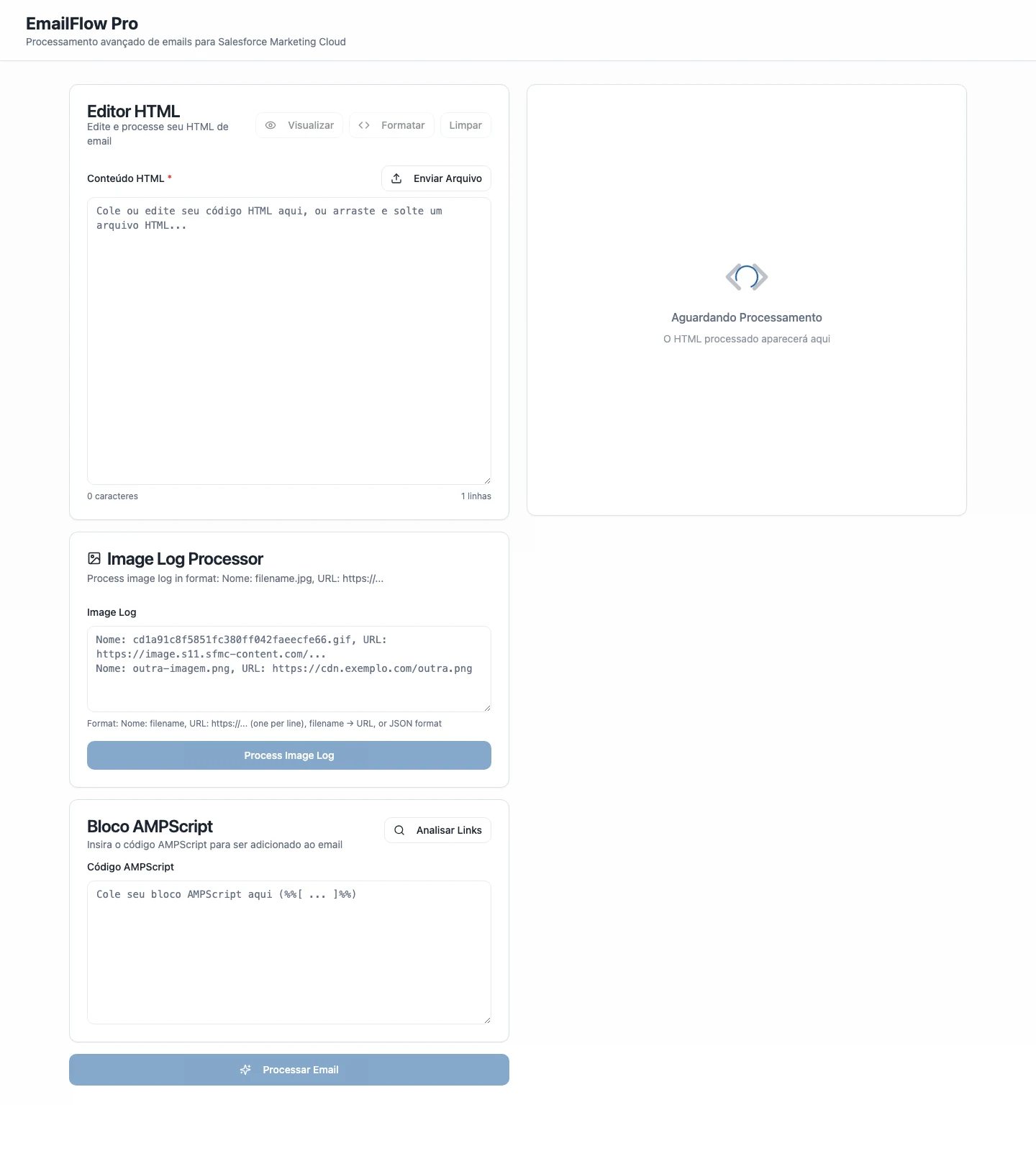
The result is a client-side single-page app with three inputs and one trustworthy output. You paste the raw email, hand it the data SFMC gives you, and it assembles a production-ready version — nothing leaves the browser.
- HTML Editor: Paste, upload a
.htmlfile, preview the rendered email, and format the markup. The starting point for every campaign. - Image Log Processor: The core. SFMC spits out an upload log like
Nome: banner.gif, URL: …sfmc-content.com/…. The tool parses it (that format,filename → URL, or JSON) and automatically rewrites every imagesrcto its final SFMC content URL — the most error-prone manual step, gone. - AMPScript Block + Link Analysis: Paste your
%%[ … ]%%block and it's injected in the right place; "Analisar Links" scans every link so you can verify protocols and tracking before the send reaches millions.
It's live — try it yourself.
Paste any email HTML and watch the three-step assembly run client-side.
A shorter, more verifiable workflow
The measurable result was a reduction in campaign production time from approximately 80 minutes to 10–20 minutes per campaign. The tool also moved the risky steps into visible, repeatable checks.
- Production time: Approximately 80 minutes to 10–20 minutes per campaign.
- Verification: Image URLs, links, AMPScript placement, and processed output became visible checks in the workflow.
- Processing: The app runs client-side, so customer HTML stays in the browser during processing.
The designer who builds
EmailFlow Pro changed how I work: when a tool limits the team, I treat that as a design problem and fix it. The same loop — understand, design, ship, measure — now runs through everything I build.
"Nobody asked me to build this. I was the user, I felt the pain, and I had the tools — so I built the infrastructure that gave me my time back."
The way I work, in one project
Find the friction, build the fix, measure the result — that's the loop behind everything in this case. If you're hiring someone who closes that loop on your team, let's talk. Thirty minutes, no slide deck.